1Why US Readers Need a Subscription Tracker in 2026
The average US household now pays for a long list of recurring services: streaming platforms like Netflix and Disney+, meal kits and subscription boxes, gym and fitness apps, cloud storage, software tools, and dozens of small app-store subscriptions billed through Apple or Google. Add in gym memberships charged to a debit card, a PayPal-billed subscription or two, and the occasional annual renewal for antivirus software or a domain name, and it is easy to lose count of what is actually being charged each month.
Free trials are a big part of the problem. A service that looked appealing for a seven-day trial quietly turns into a monthly charge on your card once the trial window closes, and most people do not notice until they scroll back through a bank or credit card statement. If you have ever been surprised by a charge you forgot you signed up for, you are not alone, that is exactly why a growing number of US shoppers are turning to dedicated tracking apps instead of trying to remember everything themselves. Our guide on finding every automatic payment in one place walks through where these charges tend to hide across your bank account, cards, PayPal, and app stores.
Checking bank statements line by line works, but it takes time and it is easy to miss something, especially with small charges that do not stand out next to rent or groceries. A subscription tracker app exists to solve exactly this problem: one place to see every recurring charge and a reminder before the next one hits. If cutting your monthly bill down is the goal, pairing a tracker with our recurring payments audit guide is a good next step once you can see everything in one list.
2What to Look For in a US Subscription Tracker
Not every subscription tracker works the same way, and the differences matter more than they first appear. Before you pick one, here is what to weigh:
- Whether it connects to your bank and cards automatically, or you add subscriptions yourself
- Renewal and free trial reminders before you get charged
- Whether it just tracks charges, or also tries to negotiate or cancel bills for you
- A clear pricing model, free or paid, with no confusing fine print
- How it handles your data, especially if it needs your bank login
- Support for both iPhone and Android
The bank connection question is worth pausing on. Apps that scan your accounts automatically can catch charges you forgot to log, but that convenience means handing over your bank or card login to a third-party service. Apps that use manual entry ask a little more of you upfront, but your banking credentials never leave your own device. Neither approach is wrong, it depends on how much convenience you are willing to trade for how much access you are comfortable giving out.
3TrackAutoPay: Track Without Linking Your Bank
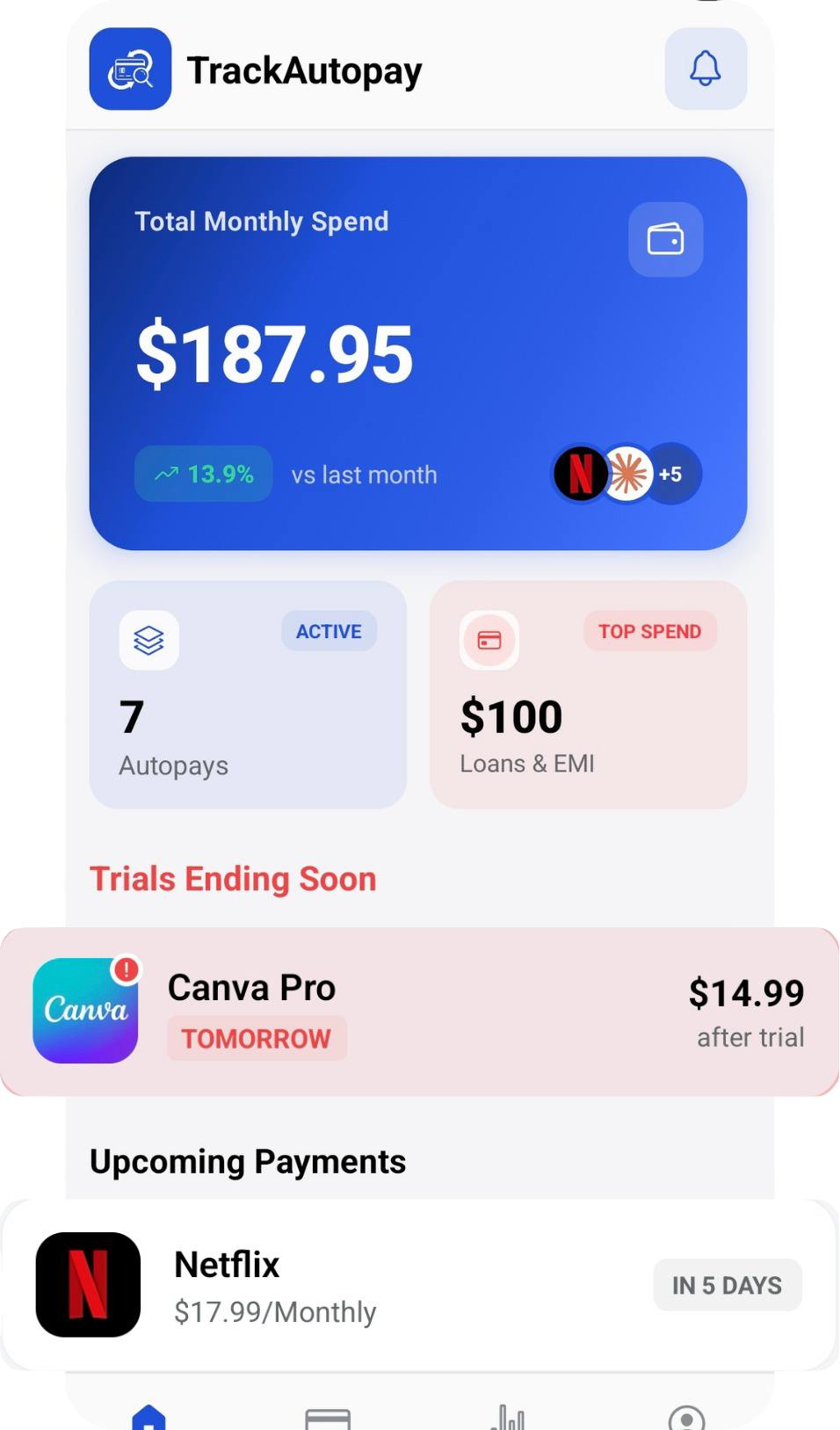
TrackAutoPay is our app, and it takes the manual-entry approach on purpose. You add each subscription yourself, whether it is billed to a bank account, a credit or debit card, PayPal, or through the Apple App Store or Google Play, and TrackAutoPay keeps them organized in one dashboard. Because it never connects to your bank, your login credentials are never shared with us or anyone else.
Manual Tracking with Full Organization: Add every recurring charge you have, bank debits, card charges, PayPal subscriptions, and app-store billing, and organize them by category, billing cycle, and priority so you can see the full picture at a glance.
Free Trial Reminders: Set the trial end date when you sign up for something new, and TrackAutoPay reminds you before the first real charge hits. You decide whether to keep it or cancel before paying anything.
Monthly Cost Breakdown: See how much you are spending on subscriptions each month, quarter, and year, broken down by category, so you know exactly where your money is going.
Cancellation Navigation: When you decide to cancel something, TrackAutoPay points you to the cancellation page or settings for that service instead of leaving you to search for it yourself.
No Bank Connection Required: Your subscription data stays with what you enter, TrackAutoPay does not ask for your bank or card login at any point, so there is no financial credential to expose.
TrackAutoPay is available on both the Apple App Store and Google Play. The Free plan covers up to 10 autopays with the full dashboard and reminders, the Pro plan at $2.99/month adds unlimited tracking, advanced analytics, and data export, and the Premium plan at $4.99/month adds extras like price change alerts and multi-device sync. TrackAutoPay does not negotiate bills or contact companies on your behalf, it is focused on giving you a clear, private view of everything you are paying for.
4Other Subscription Trackers Popular in the US
To give you a fair picture, here is how a few other well-known approaches compare. Each one takes a different trade-off between convenience, features, and how much access it asks for.
Rocket Money
Rocket Money is a well-known all-in-one budgeting app that also finds subscriptions and helps you cancel them. It connects directly to your bank and card accounts, scans your transaction history automatically, and gives you a broader view of your overall spending, not just subscriptions. It also offers a premium membership tier that includes bill negotiation, where the app tries to lower certain recurring bills on your behalf.
The trade-off is that Rocket Money needs your bank login to work, since automatic detection depends on reading your transaction history directly. The premium membership that unlocks bill negotiation is an added cost on top of the free tier, and for readers who only want a simple subscription list without linking a bank account, it is more than what they are looking for.
Bobby
Bobby is a minimalist subscription list app. You add your subscriptions manually, see your total monthly spend, and get reminders before renewals. It does not connect to your bank at all, and it is typically sold as a one-time purchase rather than a recurring subscription, which appeals to people who do not want yet another monthly charge just to track their other monthly charges.
The trade-off is a smaller feature set. Bobby is iOS-only, so Android users cannot use it, and it does not offer spending analytics, bill negotiation, or automatic detection of new charges. For someone who wants the bare minimum on an iPhone, it works well. For Android users or anyone who wants more than a plain list, it falls short.
Manual Tracking (Statements or a Spreadsheet)
Plenty of people still track subscriptions by scrolling through bank and card statements or keeping a spreadsheet. It costs nothing, works on any device, and gives you total control over how the information is organized.
The downside is that there is no automation at all. Nothing reminds you of an upcoming renewal, and every update depends on you remembering to check. As the number of subscriptions grows, this approach tends to fall apart, and forgotten charges are exactly what slip through.
5Feature Comparison Table
Here is a side-by-side look at how each option compares on the things that matter most to US readers.
| Feature | TrackAutoPay | Rocket Money | Bobby |
|---|---|---|---|
| Automatic bank/card connection | ✗ | ✓ | ✗ |
| Manual entry option | ✓ | ✓ | ✓ |
| Renewal & trial reminders | ✓ | ✓ | ✓ |
| Negotiates or cancels bills for you | ✗ | ✓ | ✗ |
| Free plan available | ✓ | ✓ | ✗ |
| No bank login required | ✓ | ✗ | ✓ |
| iOS app | ✓ | ✓ | ✓ |
| Android app | ✓ | ✓ | ✗ |
Each app makes a different trade-off. Rocket Money offers the most automation, at the cost of a bank connection and an optional premium fee. Bobby keeps things simple with no bank access, but only on iPhone and with fewer features. TrackAutoPay sits in between: no bank connection needed, a free plan to start, and support for both iOS and Android, without the bill negotiation extras.
The most common objection to subscription tracker apps is paying a recurring fee just to keep track of your other recurring fees, which is exactly why a free, no-bank-connection option matters.
6Which App Is Right for You?
The right tracker depends on how much you want automated and how much access you are comfortable giving out. Once you have picked one and logged everything you pay for, our recurring payments audit guide walks through cutting the list down.
If you want tracking and reminders without linking your bank
Our pick: TrackAutoPay
TrackAutoPay keeps your bank login private, works on both iPhone and Android, and has a free plan that covers up to 10 autopays, a good starting point for most people.
If you want an all-in-one budgeting app that also negotiates bills
Our pick: Rocket Money
If you are comfortable linking your bank and cards and want broader budgeting features alongside subscription tracking, Rocket Money covers more ground, at the cost of sharing your bank login and an optional premium fee.
If you want the simplest possible list with no bank access and no recurring fee
Our pick: Bobby
For iPhone users who want a lightweight, one-time-purchase list with no bank connection, Bobby is a clean option, as long as you do not need Android support or deeper features.
If you are comfortable maintaining it yourself
Our pick: Manual tracking
A spreadsheet or a regular read-through of your statements costs nothing and gives you full control, provided you are disciplined enough to check it regularly.
7The Bottom Line
Every subscription tracker on this list solves the same basic problem, giving you one place to see what you are paying for instead of hunting through statements. The real differences come down to how much automation you want and how much access you are willing to give in exchange for it. Rocket Money trades a bank connection for more automation. Bobby trades features for simplicity and privacy on iPhone only. TrackAutoPay aims for the middle: private, manual tracking with reminders, on both iOS and Android, with a free plan to start.
Whichever app you choose, the goal is the same, stop guessing what is coming out of your account each month and get a clear, honest view of it instead.
Track Every Subscription Without Linking Your Bank
See every subscription, trial, and renewal in one dashboard, and get a reminder before you are charged.